 .. ..
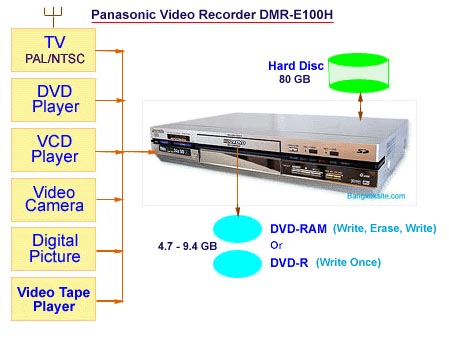
Figure 10
Caution :
1. The Hard Disk can be used to record
video signals from PAL and NTSC
systems. But the DVD-RAM can record only one system either PAL or
NTSC (can not mix two systems on one DVD-R disc).
2. Check and set the TV system to PAL or
NTSC according to the source.
For example if you want to record the TV programs in PAL then your TV
must be set to PAL. (Use Functions and select SET UP).
3. Before recording check the Input Source carefully. For example, if you
use input AV2 (Front Panel Input) use the remote control to set the
"Input Select" to AV2.
4. In case of mixed up it may be necessary to delete all recorded items
or FORMAT the disk.
5. You can dub the programs from DVD-RAM to Hard Disk but you can not
dub the programs from DVD-R to Hard Disk. (This is an unfortunate
situation). It may be necessary to buy another cheap DVD player to do
the job of recording from DVD to Hard Disk.
Contact Me
somkiet@cscoms.com
|
Sources
for Recording
Figure 10 shows a simplified
diagram for
recording TV, DVD (if not protected),
VCD, Video pictures from video camera
or digital video, digital pictures, and
video tapes.
The input can be at AV1, AV2, or AV3 or
S-Video.
The DVD Video Recorder can be assigned
to record on Hard Disc, DVD-RAM or
DVD-R. For this equipment it is better to
record on the Hard Disc first and then
you can view the programs or re-record
it onto the DVD-R later on. This will enable
the DVD-R to be played on other DVD
players or on any computer equipped with
DVD-ROM drive.

Figure
11 Remote Control |
